
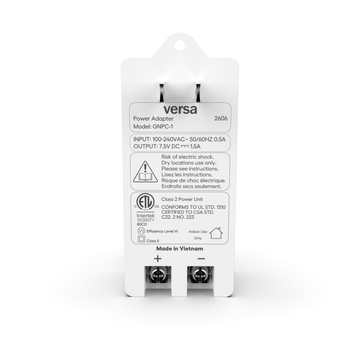


Accessory - Camera power adapter
GNPC-1 Google Nest Cam Power Adapter

A transformer-only 7.5V DC, 1.5A Class 2 power adapter for wired Google Nest Cam installs. The Google-supplied camera cable lands on its two screw terminals, with a run budget of 75 ft on 18 AWG.
Where to buy the GNPC-1

Don't see your distributor? See all Versa distributors ->
At a glance
On this page: Overview Features Setup Specs Compatibility FAQ
Overview
A 7.5V DC, 1.5A power adapter for wired Google Nest Cam installs
The Versa Wireless GNPC-1 is a Google Nest Cam power adapter built for security pros: a transformer-only 7.5V DC, 1.5A Class 2 power unit for wired Google Nest Cam installs. It plugs into a standard indoor outlet, takes a 100-240V AC input, and it's ETL Listed by Intertek. You can buy it through security distribution or right here on this page.
Transformer-only is the point, and we built it that way on purpose. The GNPC-1 has no captive cord. Instead it ends in two screw terminals marked + and - on the bottom edge, and the camera cable Google supplies to security professionals lands right there. So a kit that bundles a second cable is wire you'd carry around and throw back in the truck, and one power SKU covers the wired Nest Cam jobs instead.
The other number that earns its place is the run budget. The GNPC-1 is rated for up to 75 ft (22.9 m) on 18 AWG or heavier conductor. Because that figure is published, you can plan the outlet-to-camera route on paper before the ladder comes off the truck. A basement outlet to a second-story soffit sits inside the budget. The adapter stays indoors at the outlet, which means the camera end needs no outdoor receptacle and no in-use cover.
The housing is a slim 1.71 x 1.15 x 3.75 in. two-prong unit with a mounting tab molded into the top. A screw through that tab anchors the adapter flat to the wall plate, so camera power can't be defeated by pulling a brick out of a socket. Short-circuit protection shuts the output down on a fault and recovers on its own once the fault clears, and NTC thermal protection covers inrush and overheating. You'll find the full figures in the specifications below and in the GNPC-1 datasheet.
Key features
What you get in the box
- Matches the 7.5V DC, 1.5A rating Google publishes for the GPJ15 variant of the Nest Cam Outdoor (wired, 2nd gen).
- Transformer-only, so it pairs with the camera cable Google supplies to security professionals.
- Two screw terminals marked + and - in place of a captive cord, which is where that cable lands.
- A published run budget of up to 75 ft (22.9 m) on 18 AWG or heavier conductor, so you can plan the route on paper.
- 100-240V AC input at 50/60 Hz and 0.5A, and it's a Class 2 Power Unit with Class II double insulation.
- A security mounting screw hole that anchors the adapter flat to the wall plate, so it can't be pulled out of the socket.
- Short-circuit protection that shuts the output down on a fault and recovers on its own once the fault clears.
- NTC thermal protection that covers inrush current and overheating.
- ETL Listed by Intertek under control number 5030071 80CD, to UL 1310 and CSA C22.2 No. 223, and it's an Efficiency Level VI supply for indoor, dry locations.
Setup
Install the GNPC-1 in three steps
Plan the run
Pick an interior outlet and confirm the route to the camera is 75 ft or less on 18 AWG or heavier. Heavier wire buys you margin, and thinner wire spends the budget faster than the length alone suggests.
Land the camera cable
Land the conductors of the Google-supplied camera cable under the two screw heads on the bottom of the adapter. Match the + and - markings and tighten them fully, then run and dress the cable to the camera and connect the camera end per Google's guide for that model.
Anchor it and power up
Drive a screw through the mounting tab into the wall plate, plug the adapter in, and confirm the camera comes up. The adapter stays indoors at the outlet, in a dry location.
For an outdoor camera, Google's install guide describes two routes: out to an outdoor outlet, or in through a vent or a drilled hole to an indoor one. The indoor route is the one the GNPC-1 is built for. The adapter is an indoor Class 2 unit, and the 75 ft budget is what makes that reach practical. Our Google Nest Cam power adapter installer guide walks through both routes.
Specifications
GNPC-1 specifications
Google Nest Cam power adapter, transformer-only
| Electrical | |
|---|---|
| Input | 100-240V AC, 50/60 Hz, 0.5A |
| Output | 7.5V DC, 1.5A |
| Class | Class 2 Power Unit; Class II (double insulated) |
| Efficiency | Efficiency Level VI external power supply |
| Output wiring & compatibility | |
|---|---|
| Termination | Two screw terminals marked + and -; no captive cord |
| Maximum run | 75 ft (22.9 m) |
| Minimum wire gauge | 18 AWG or heavier |
| Application | Power adapter for wired Google Nest Cam installs |
| Rating matched | 7.5V DC / 1.5A - the adapter rating Google's Safety and Regulatory Guide lists for the GPJ15 variant of the Nest Cam Outdoor (wired, 2nd gen) |
| Camera cable | Pairs with the camera cable Google supplies to security professionals |
| Physical & protection | |
|---|---|
| Dimensions | 1.71 x 1.15 x 3.75 in. |
| Plug type | Two-prong plug-in (NEMA 1-15P) |
| Mounting | Integrated security mounting screw hole, so the adapter anchors to the wall plate |
| Short circuit | Automatic shutdown on an output fault; self-recovers once the fault clears |
| Thermal | NTC inrush limiting and overheat protection |
| Use | Indoor use only; dry locations only; residential and commercial |
| Certifications & compliance | |
|---|---|
| Safety listing | ETL Listed by Intertek, control number 5030071 80CD |
| Standards | Conforms to UL STD. 1310; certified to CSA STD. C22.2 No. 223 |
| Origin | Made in Vietnam |
Safety: risk of electric shock. Dry locations use only, indoor use only, as marked on the label. Use Class 2 rated conductor, 18 AWG or heavier, and keep the total run within the 75 ft rating. Match polarity at the + and - terminals and tighten the conductors fully under the screw heads. Mount the adapter and dress the run per Google's install guide for your camera model.
Compatibility
Cameras and cables the GNPC-1 works with
We built the GNPC-1 as a 7.5V DC, 1.5A Class 2 power adapter for wired Google Nest Cam installs. Google's Safety and Regulatory Guide lists the adapter rating each variant of the Nest Cam Outdoor (wired, 2nd gen) takes. The GPJ15 variant takes 7.5V DC at 1.5A, which is the rating the GNPC-1 supplies. So check the model number printed on your camera against that guide, then plan the run with the camera cable Google supplies to security professionals.
Documentation: the GNPC-1 datasheet and the full Versa installation manuals library, plus our Google Nest Cam power adapter installer guide. Browse the rest of the range in Versa accessories or see every Versa Wireless product.
FAQ
GNPC-1 questions installers ask
Does the GNPC-1 come with a camera cable?
No cable is bundled, and that's deliberate. Google supplies the matching camera cable to security professionals with the camera hardware, so a kit with a second one is a part you'd pay for twice.
The GNPC-1 is the transformer alone. It ends in two screw terminals marked + and -, and the Google-supplied cable lands on them. If you're matching a Nest camera power adapter by rating rather than by model name, 7.5V DC at 1.5A is the figure.
What wire does the GNPC-1 take, and how long can the Nest Cam power cord run?
Use 18 AWG or heavier Class 2 conductor. The GNPC-1 is rated for up to 75 ft (22.9 m) at that gauge. That's enough to put the adapter at an interior outlet and still reach a camera on the far side of the house.
Treat 75 ft as the ceiling of the run budget rather than a target. Heavier wire buys you margin, and thinner wire spends it faster than the length alone suggests.
How do I power a Nest Cam that is mounted outdoors?
Keep the adapter indoors at the outlet and run the cable out to the camera, which is how we'd do it. Google's install guide describes two routes: out to an outdoor outlet, or in through a vent or a drilled hole to an indoor one.
The indoor route wins on pro jobs. The GNPC-1 is an indoor Class 2 unit, so it sits at an interior receptacle and the camera end needs no outdoor outlet and no in-use cover. The 75 ft budget is what makes that reach practical.
How do I install the GNPC-1?
Plan the run. Pick an interior outlet and confirm the route to the camera is 75 ft or less on 18 AWG or heavier.
Land the cable. Put the conductors of the Google-supplied camera cable under the two screw heads on the bottom of the adapter, match the + and - markings, and tighten them fully.
Run it to the camera. Dress the cable along the route, then connect the camera end per Google's guide for that model.
Anchor and power up. Drive a screw through the mounting tab into the wall plate, plug the adapter in, and confirm the camera comes up.
Which Nest Cam does the GNPC-1 power?
The GNPC-1 supplies 7.5V DC at 1.5A. That's the adapter rating Google's Safety and Regulatory Guide lists for the GPJ15 variant of the Nest Cam Outdoor (wired, 2nd gen). Google lists the rating per camera variant, so the model number printed on the camera is what tells you which adapter it takes.
Check that number against Google's guide before you order, then plan the run with the camera cable Google supplies to security pros.
What are the GNPC-1 power specifications?
The GNPC-1 is a Class 2 Power Unit with a 100-240V AC input at 50/60 Hz and 0.5A, and a 7.5V DC, 1.5A output, so you can plug it into any outlet you'd find on a US job. It uses a two-prong NEMA 1-15P plug and measures 1.71 x 1.15 x 3.75 in.
It's Class II double insulated, and it's an Efficiency Level VI external power supply. That's the current US efficiency mark for an adapter that stays plugged in all day.
Can the GNPC-1 be locked down so it does not get unplugged?
Yes. A mounting tab is molded into the top of the housing with a screw hole through it. Drive a screw through the tab into the wall plate and the adapter sits flat and stays put.
Camera power then can't be defeated by pulling a brick out of a socket, which is the detail commercial and multi-tenant sites ask for.
Is the GNPC-1 safety certified?
Yes. The GNPC-1 is ETL Listed by Intertek under control number 5030071 80CD, and the label prints that it conforms to UL STD. 1310 and is certified to CSA STD. C22.2 No. 223. Those are the Class 2 power unit standards for an indoor adapter like this one.
Short-circuit protection and NTC thermal protection are both built in, so a fault at the output shuts it down and it recovers on its own once the fault clears.
Where do I buy the GNPC-1?
Direct from this page, or through the SS&Si Dealer Network on your dealer account. The SS&Si button at the top of this page opens the GNPC-1 listing, and the Where to Buy page lists every Versa distributor. If you install professionally and do not have a wholesale account with Versa yet, contact Versa Wireless and we will get you set up.


