
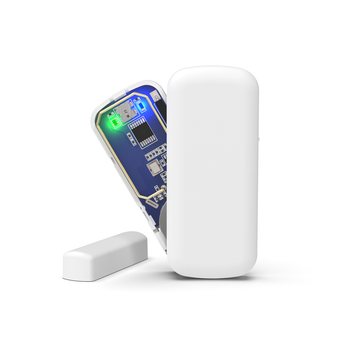


319.5 MHz sensor - Door and window contact
MINI-319 Wireless Door Window Sensor


A 319.5 MHz door contact for Qolsys IQ and GE/Interlogix panels. It's 0.25 in. deep, runs 5+ years on one CR2032, and the blue Bluefield LED shows you the magnet is in range before you walk back to the keypad.
Where to buy the MINI-319


Don't see your distributor? See all Versa distributors ->
At a glance
On this page: Overview Features Setup Specs Panels FAQ
Overview
A 319.5 MHz door window sensor built for tight casing
The Versa Wireless MINI-319 is a 319.5 MHz wireless door window sensor for Qolsys IQ and GE/Interlogix panels. Installers call it a door contact sensor. The transmitter mounts on the frame and the magnet mounts on the moving door or window. As a Qolsys door sensor it enrolls on a standard perimeter zone, the same as any other 319.5 MHz contact the panel already knows.
The transmitter measures 2.2 x 1 x 0.25 in., and that quarter inch of depth is the whole point. It sits nearly flush on tight casing and in narrow window channels where a thicker contact won't fit. One Panasonic CR2032 coin cell runs it for 5+ years. The magnet holds up to 1 in. of standoff on wood and 1/4 in. on metal, so a door that doesn't sit tight to its frame still reads closed, and the reed switch reports open the moment the magnet leaves range. A cover tamper reports when the housing is opened.
Here's the part worth knowing before you mount it, because the install indicator runs on a timer. The patented Bluefield blue LED lights when the magnet is within range, and the green LED flashes on every transmission. Both stay live for 15 minutes after you fit the battery or pull the cover, then they turn off. So you get a 15 minute window to set the magnet, confirm the blue LED at the closed position, and see the green LED flash as the sensor transmits. If the window closes before you're done, slide the cover off and it starts again. Signal strength is a separate check, so run the panel's Go/No Go test before you commit the tape.
Setup is short. Put the panel in autolearn, open and close the magnet once, name the zone and touch ADD. The cover slides off by hand, so battery swaps and color changes take seconds with the sensor still on the frame. Every figure is in the specifications below, and the full step-by-step is in the MINI-319 installation manual.
Key features
What you get in the box
- A 319.5 MHz wireless door window sensor, so it enrolls on Qolsys IQ and GE/Interlogix-class panels as a standard door contact.
- A built-in serial number, which the panel picks up on the first open and close while it's in autolearn.
- The patented Bluefield magnet indicator, so a blue LED tells you the magnet is in range right at the opening.
- A green LED that flashes on transmit, which means you see the signal leave the sensor while you're still standing at the door.
- A red low-battery warning, flashing once about every five seconds for two minutes after a transmission.
- A 15 minute install window, so the blue and green LEDs run after you fit the battery or pull the cover, and sliding the cover restarts them.
- A low-profile transmitter, just 2.2 x 1 x 0.25 in. (55.9 x 25.4 x 6.4 mm), so it fits tight casing and narrow window channels.
- A high-power neodymium magnet, good for up to 1 in. of gap on wood and 1/4 in. on metal.
- A reed switch plus a cover tamper, and the panel sees both.
- 5+ years on one battery, a Panasonic CR2032 lithium coin cell you can buy anywhere.
- A slide-off cover, which makes battery service and color changes a no-tools job with the sensor still on the frame.
- Listed and covered, with regulatory listings UL 639 / UL 1023 and ULC-S304 / C1023, FCC Part 15 and ISED licence-exempt RSS compliance, and a 2 year warranty.
Setup
Add the MINI-319 to a panel
Fit the battery
Slide the cover open, fit the CR2032 with the plus side up and slide the cover back on. The blue and green LEDs come on and stay live for 15 minutes.
Put the panel in autolearn
Open the panel's programming menu and start autolearn mode, the same way you would for any other 319.5 MHz contact.
Open and close the magnet
Bring the magnet to the sensor and pull it away once. The panel picks up the built-in serial number from that transmission, and the green LED flashes as it goes out.
Name it and mount it
Name the zone, set the zone type and touch ADD. Run the panel's Go/No Go test from the mounting spot, then press the tape down with the blue LED lit at the closed position.
Mount the transmitter on the frame, the part that stays still, and the magnet on the door or the opening sash. Keep both away from metal and foil wallpaper, and away from rooms full of electrical wiring like a furnace room. Our guide to 319.5 MHz sensors on the Qolsys IQ Panel 4 and 5 covers the SRF card part numbers and the software level you need.
Specifications
MINI-319 specifications
319.5 MHz low-profile door and window contact
| Wireless and RF | |
|---|---|
| Frequency | 319.5 MHz |
| Panel compatibility | Qolsys IQ Panel 2+, IQ Panel 4, IQ4 Hub and IQ Panel 5 fitted with the Qolsys 319.5 MHz SRF card (Dual SRF panel), plus GE/Interlogix-class 319.5 MHz panels |
| Enrollment | Built-in unique serial number, learned in autolearn mode on a supervised zone |
| Zone type | Single-zone door and window contact (door window sensor) |
| Detection and function | |
|---|---|
| Bluefield magnet indicator | Patented - the blue LED lights when the magnet is within proper range, 1 in. maximum |
| LED indicators | Blue (magnet in range), green (transmit), red (low battery) |
| Install LED window | Blue and green active for 15 minutes after battery installation or cover removal; remove the cover to restart |
| Low-battery signal | Red LED flashes once about every five seconds for two minutes after a transmission |
| Reed and tamper | Internal reed switch; tamper on cover removal |
| Magnet gap (maximum) | 1 in. (25.4 mm) on wood, 1/4 in. (6.35 mm) on metal |
| Magnet type | Neodymium rare earth |
| Physical | |
|---|---|
| Transmitter dimensions | 2.2 x 1 x 0.25 in. (55.9 x 25.4 x 6.4 mm) |
| Magnet dimensions | 1 x 0.25 x 0.25 in. (25.4 x 6.35 x 6.35 mm) |
| Mounting | Surface mount on the frame, double-faced tape supplied |
| Enclosure | Slide-off cover for tool-free battery service and color changes; white as shipped, brown and black covers sold separately |
| Power | |
|---|---|
| Battery | 1 x 3VDC 225 mAh lithium coin cell, Panasonic CR2032, fitted plus side up |
| Battery life | 5+ years typical |
| Environmental | |
|---|---|
| Operating conditions | 32 to 122 deg F (0 to 50 deg C) |
| Relative humidity | 95% non-condensing, UL tested at 85% |
| Use | Indoor, away from moisture |
| Certifications and warranty | |
|---|---|
| Regulatory listings | UL 639 / UL 1023, ULC-S304 / C1023 |
| Radio compliance | FCC Part 15 and ISED Canada licence-exempt RSS; grantee records are public at the FCC ID search |
| Document | V0000423-01-02 MINI-319 installation instructions |
| Warranty | 2 years from the original date of consumer purchase |
Mount the transmitter on the door or window frame, not on the glass. Keep the sensor and magnet clear of metal and metallic surfaces such as foil wallpaper. Choose a location away from large runs of electrical wiring, such as a furnace or utility room. Keep the sensor out of areas exposed to moisture, and inside the 32 to 122 deg F operating range. Battery caution: risk of fire, explosion and burns. Do not recharge, disassemble, heat above 212 deg F (100 deg C), or incinerate. Dispose of used batteries properly and keep them away from children. Use of a battery other than the specified Panasonic CR2032 may present a risk of fire or explosion. Refer to the installation instructions for the control panel this device is used with for details on the limitations of the entire alarm system.
Panels
Panels the MINI-319 works with
The MINI-319 works with Qolsys IQ panels and GE/Interlogix-class panels that receive 319.5 MHz. Qolsys IQ panels hear 319.5 MHz once the Qolsys 319.5 MHz SRF card is fitted. That covers the IQ Panel 2+, IQ Panel 4, IQ4 Hub and IQ Panel 5. Those panels run PowerG plus one legacy band at a time, so the card in the slot decides which frequency the panel hears. Check the card before you order, fit the 319.5 MHz card, and the MINI-319 learns in. Our guide to 319.5 MHz sensors on the Qolsys IQ Panel 4 and 5 covers the part numbers and the software level.
Documentation: the MINI-319 installation manual and the MINI-319 datasheet. The Versa panel compatibility guide covers every panel family we sell into, and the dealer guide to the Versa sensor line shows the whole 319.5, 345 and 433 MHz lineup. Brown and black color covers are in accessories, and if you've got a question on a specific panel, contact Versa Wireless.
FAQ
MINI-319 questions installers ask
What panels does the MINI-319 door window sensor work with?
The MINI-319 works with Qolsys IQ panels and GE/Interlogix-class panels that receive 319.5 MHz, and it enrolls as a standard perimeter zone on all of them.
Qolsys IQ panels read 319.5 MHz once the Qolsys 319.5 MHz SRF card is in the slot. That covers the IQ Panel 2+, IQ Panel 4, IQ4 Hub and IQ Panel 5.
Does the MINI-319 need the 319.5 MHz SRF card on a Qolsys IQ Panel 4 or 5?
Yes. Qolsys IQ panels run PowerG plus one legacy band at a time, and the SRF card in the slot sets that band. With the 319.5 MHz card fitted, the MINI-319 learns in as a standard door contact.
Some IQ Panel 4 models ship 319.5-ready from the factory, so check the model number before you order a card. Our Qolsys 319.5 MHz guide lists the part numbers and the panel software level.
How do I add or pair the MINI-319 to a panel?
Put the panel in autolearn: open its programming menu and start autolearn mode.
Open and close the magnet once: the panel picks up the sensor's built-in serial number from that transmission, and you'll see the green LED flash as it goes out.
Name the zone: set the zone name and the zone type, then touch ADD.
Run the panel's Go/No Go test from the mounting spot before you press the tape down. The green LED tells you the sensor transmitted, not that the panel heard it.
Why did the blue and green LEDs stop lighting up?
They're on an install timer. Both run for 15 minutes after you fit the battery or remove the cover, then they turn off.
To bring them back, slide the cover off. The 15 minute window starts over, so you can re-check magnet placement on a sensor that's already mounted without touching the panel.
What is the Bluefield magnet indicator?
Bluefield is Versa's patented magnet-placement indicator. The blue LED lights when the magnet is within proper range of the transmitter, which is 1 in. maximum.
You set the magnet, close the door and read the blue LED right at the opening. That confirms placement on the spot, so you're not walking back to the keypad to check the zone.
How wide a gap will the MINI-319 magnet hold?
Up to 1 in. (25.4 mm) on wood, and up to 1/4 in. (6.35 mm) on metal, with a high-power neodymium rare-earth magnet doing the work.
Metal near the magnet pulls the field, so plan on the tighter figure for steel doors, aluminum window frames and metal casing. Let the blue LED confirm the gap before you stick anything down.
Where should I mount the MINI-319?
Put the transmitter on the part that stays still, the frame, and the magnet on the part that moves, the door or the sash. Keep both away from metal and metallic surfaces such as foil wallpaper, because metal pulls the magnet's field and shortens the gap.
Stay out of furnace rooms, utility rooms and anywhere with a large amount of electrical wiring, and out of damp spots. Run the panel's Go/No Go test at the spot before you commit the tape, because that test is the only check of signal strength.
What battery does the MINI-319 use and how long does it last?
One 3VDC 225 mAh Panasonic CR2032 lithium coin cell, with a typical life of 5+ years.
The cover slides off by hand, so you swap the cell with the sensor still on the frame, plus side up. The red LED flags a low battery first, flashing once about every five seconds for two minutes after a transmission.
Is the MINI-319 an S-Line sensor?
The MINI-319 is a standard 319.5 MHz sensor. It enrolls on the panel's normal zone types and reports open, close and cover tamper, so you can fill out or extend an existing system with MINI-319 contacts.
S-Line is Qolsys's own encryption layer for Qolsys-branded sensors, and both kinds sit on the same 319.5 MHz panel together.
How is the MINI-319 different from the MINI-345 and MINI-433?
They're the same wireless door sensor in three radio bands, so you pick by the panel. The MINI-319 is 319.5 MHz for Qolsys IQ and GE/Interlogix.
The MINI-345 is the 345 MHz version and the MINI-433 is the 433 MHz version. Pick by the frequency the panel receives, and all three carry Bluefield and the slide-off cover.
What else can I put on the same 319.5 MHz panel?
Versa's 319.5 MHz line covers the perimeter and the interior of a home security system on one frequency. The SHOCK-319 mounts on the frame, and a DIP switch selects shock only or shock plus its built-in contact on the same zone.
The PIR-319 covers interior motion with 55 lb pet immunity. Browse the whole range in door and window sensors.


