
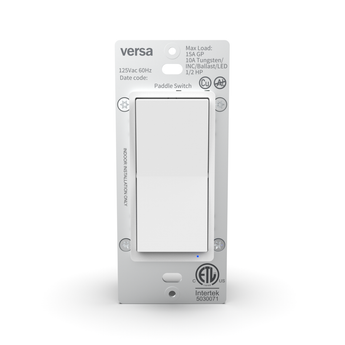


SWITCH-ZW
The Versa Wireless SWITCH-ZW is an in-wall Z-Wave light switch built on Z-Wave 800 Series Long Range. It is a wired Z-Wave smart switch that replaces an ordinary single-pole or 3-way paddle switch, so a hardwired lighting circuit runs from your hub. On Long Range it reaches up to 1300 ft straight to the controller, or 330 ft (100 m) per hop on classic mesh.
It switches the circuit rather than dimming it, so the only load question is the wattage limit. The ETL listing rates it at 1875 W (15 A) general purpose or resistive, 1250 W (10 A) tungsten, incandescent, ballast or LED, and 1/2 HP motor at 125 VAC. A neutral is required, and the terminals take copper wire only.
In a 3-way circuit the SWITCH-ZW goes in the box with line power, and the second switch stays an ordinary mechanical 3-way switch. Here is the part that catches installers out: that second switch carries no load current at all. It makes and breaks a low-current signal loop, and the light is fed only from the SWITCH-ZW's LOAD terminal. Wire it exactly the way the printed diagram shows - that diagram is copied terminal for terminal from the factory wiring sheet.
Pairing uses SmartStart: scan the Z-Wave QR code on the metal yoke under the paddle. Double-tap either paddle to fire a scene. Five settings cover paddle orientation, the LED, auto on and off timers, and what happens after a power cut - see Z-Wave configuration parameters and association groups. Full specifications are in the Specifications tab, and the step-by-step is in the SWITCH-ZW installation manual.
Key features
- Z-Wave 800 Long Range - up to 1300 ft straight to the controller, or 330 ft (100 m) per hop on classic mesh
- In-wall paddle light switch for single-pole or 3-way lighting circuits - a neutral is required
- 1875 W (15 A) general purpose / resistive, 1250 W (10 A) tungsten / incandescent / ballast / LED, 1/2 HP motor at 125 VAC
- Wired as a Z-Wave 3-way switch, the second switch is an ordinary mechanical switch and carries no load current
- Double-tap either paddle to trigger a scene - Scene 1 from the top, Scene 2 from the bottom
- SmartStart pairing with S2 encryption - scan the QR code on the metal yoke under the paddle
- Built-in repeater - strengthens the mesh for other mains-powered devices
- Works with any Z-Wave certified hub, older or newer generation
- Comes back on, off, or to its last state after a power cut
- Copper wire only, 14 AWG or larger rated 80 deg C or higher
- Indoor, US 125 VAC | FCC Part 15 Class B | ETL Listed (c-US) to UL 60730-1 and CSA E60730-1:2015
SWITCH-ZW Specifications
Z-Wave 800 LR In-Wall Smart Paddle Switch
| Wireless & Z-Wave | |
|---|---|
| Protocol | Z-Wave 800 Series with Long Range |
| Frequency | 908.42 / 916 MHz mesh - 912 / 920 MHz LR |
| Range | Up to 1300 ft direct-to-controller (LR) - 330 ft (100 m) per hop (mesh) |
| Signal Repeater | Built-in - all non-battery nodes act as repeaters on a classic mesh network |
| Controller Compatibility | Any Z-Wave certified controller. Long Range requires an 800 Series controller with Long Range enabled |
| Network Interoperability | Works with any Z-Wave certified network. Older and newer Z-Wave devices work together |
| Device IDs | Manufacturer 0x0464 | Product Type 0xEE00 | Product ID 0xEE01 | Installer Icon 0x0700 | User Icon 0x0704 |
| Version | 1.0 - Z-Wave SDK 7.24.1, Z-Wave version 8.2 |
| Pairing & Security | |
| SmartStart | Yes - scan the Z-Wave QR code on the metal yoke under the paddle; the full DSK is printed on the carton; auto-added within 10 minutes |
| Security | S2 encrypted pairing. Use a controller that supports S2 |
| Manual Inclusion | Press the TOP paddle 3x quickly - blue LED flashes, green 2 s = success, red 2 s = failed |
| Manual Exclusion | Press the BOTTOM paddle 3x quickly |
| Association Group 1 | Lifeline - up to 5 nodes, Binary Switch Report; most controllers configure this automatically during inclusion |
| Association Group 2 | Single Press - sends on or off to up to 5 devices when the paddle is pressed. This device-to-device path runs on a classic mesh network. In Long Range mode the switch talks to the controller, so build the same behavior as a hub automation |
| Factory Reset | Press the BOTTOM paddle 2x quickly, then hold for at least 10 seconds - purple flashing, then solid purple 2 s = reset complete |
| Power & Load | |
| Input | 125 VAC, 60 Hz |
| General Purpose / Resistive Load | 1875 W (15 A) max |
| Tungsten / Incandescent / Ballast / LED | 1250 W (10 A) max |
| Motor Load | 1/2 HP max |
| Load Types | Lighting loads only - see the safety note below |
| Wiring | Single-pole or 3-way | neutral required | line goes to LINE and load to LOAD, each in its own terminal. The load wire may be black or red |
| Wire | Copper conductors only - marked on the switch with the Cu symbol; 14 AWG or larger, rated 80 deg C or higher; strip 5/8 in. (16 mm) |
| Terminal Torque | 12 lbf-in (14 kgf-cm). Loosen the screw counter-clockwise, push the straight wire end into one of the two holes behind the terminal, then tighten clockwise with a hand screwdriver |
| Ground | Green GROUND terminal on the top of the switch |
| Terminal Map | Named on the back of the device - GROUND top, LOAD upper-left, TRAVELER upper-right, LINE lower-left, NEUTRAL lower-right |
| Tools | Phillips and flat-blade screwdrivers, wire stripper, non-contact voltage tester |
| Wall Box | Single-gang, 2-3/4 in. minimum depth. Uses a standard decorator-style wall plate |
| 3-Way Companion | An ordinary mechanical 3-way switch. The SWITCH-ZW goes in the box with line power. The second switch gets the red traveler on a traveler screw and a white wire from its COMMON screw to the neutral bundle. It carries no load current |
| Power-Fail Restore | Yes - last state (default), on, or off, set by parameter 8 |
| First Power-Up | A switch that has never joined a network starts up off, with the blue LED on. A switch already on a network returns to its last state, easing the light back up |
| Function & Indicators | |
| Device Type | In-wall on/off paddle switch (binary switch) |
| Paddle Control | Top 1x = ON, bottom 1x = OFF (parameter 1) | top 8x cycles parameter 1, bottom 8x cycles parameter 8, bottom 10x cycles parameter 2 |
| Central Scene | Top paddle 2x = Scene 1 | bottom paddle 2x = Scene 2 |
| Button Function | Parameter 1 - 0 = top ON / bottom OFF (default), 1 = top OFF / bottom ON, 2 = both paddles toggle |
| LED Behavior | Parameter 2 - 0 = follows paddle position (default), 1 = follows the relay, 2 = always off, 3 = always on |
| Timers | Auto turn-off and auto turn-on, 1-65535 minutes (parameters 4 and 6, disabled by default) |
| Configuration Parameters | 5 total - 1, 2, 4, 6, 8 |
| LED Indicator | Solid blue = switch status, behavior set by parameter 2 | blue flashing = inclusion or exclusion in progress | green 2 s = success, red 2 s = failed | green 3x = parameter changed, red 3x = change failed | purple flashing = factory reset in progress, solid purple 2 s = reset complete |
| Operating Conditions | |
| Operating Temperature | 32 to 104 deg F (0 to 40 deg C) |
| Use | Indoor - dry locations only, lighting loads only |
| Market | US (125 VAC) |
| Origin | Made in Vietnam |
| Warranty | 2 years from the original date of consumer purchase |
| Certifications & Compliance | |
| Safety Listing | ETL Listed by Intertek, c-US mark - UL 60730-1 and CSA E60730-1:2015 (automatic electrical controls) | Intertek control no. 5030071 |
| FCC | FCC Part 15 Class B | FCC ID: 2AD9XSWITCH-ZW |
| RF Exposure | Complies with FCC uncontrolled-environment limits - install and operate with 20 cm minimum separation from any person |
| Z-Wave Alliance | Z-Wave Plus certified - Z-Wave 800 Long Range, SDK 7.24.1 |
Turn off the breaker before you start. Verify the circuit is dead with a non-contact voltage tester. Install per the National Electrical Code and local regulations. Where code requires it, a qualified licensed electrician must do the work. Do not exceed 1875 W (15 A) general purpose or resistive, 1250 W (10 A) tungsten, incandescent, ballast or LED, or 1/2 HP motor. Use copper conductors only. Line and load must not be swapped. Lighting loads only - do not use this switch to control receptacles, tube or fluorescent fixtures, transformer-supplied fixtures, heat lamps, sun lamps, medical or life-support equipment, electric heaters, or any appliance that could become hazardous if it operated unattended. Do not include appliance-controlling devices in groups or scenes. Indoor use only, in dry locations.
Long Range is where the category is heading: most new Z-Wave certifications are Long Range. The SWITCH-ZW is an in-wall Z-Wave switch that works with any Z-Wave certified controller. That includes 2GIG EDGE, Qolsys IQ, SmartThings, Hubitat, and Home Assistant with a Z-Wave 800 controller. On a classic mesh network every mains-powered device acts as a repeater, and this switch is one of them.
To use Long Range, pair it to an 800 Series Long Range controller with SmartStart. Scan the Z-Wave QR code on the metal yoke under the paddle using your controller app. The switch joins on its own within 10 minutes, using S2 encryption. The full DSK is printed on the carton. To join a classic mesh instead, set the controller to add a device and press the top paddle three times quickly.
SWITCH-ZW questions installers ask
Does the SWITCH-ZW require a neutral wire?
Yes. The SWITCH-ZW is a neutral-required in-wall Z-Wave light switch. Line, load, neutral and ground all land on the device, plus a traveler in a 3-way install. There is no no-neutral mode. Line and load are not interchangeable, so check which is which before you wire it. The neutral in a box is usually a bundle under a wire nut. Land the supplied white jumper from that bundle on the NEUTRAL terminal. Every terminal takes copper wire only, 14 AWG or larger rated 80 deg C or higher. The load wire may be black or red. Check the box has a neutral before you pick this switch for that location.
Can the SWITCH-ZW be used as a Z-Wave 3 way switch?
Yes. Wired as a Z-Wave 3-way switch, the second location is an ordinary mechanical 3-way switch, not another smart switch and not an add-on. Put the SWITCH-ZW in the box that has line power. Its LOAD terminal feeds the light directly.
The mechanical switch gets two wires. The red traveler goes from the SWITCH-ZW's TRAVELER terminal to a traveler screw. A white wire goes from its COMMON screw back to the neutral bundle. That is a low-current signal loop, not a power path, so no load current passes through the second switch at all. If the wiring in the wall does not match that, stop and call an electrician.
What loads can the SWITCH-ZW control?
Lighting loads, inside its ETL-listed ratings at 125 VAC. That is up to 1875 W (15 A) general purpose or resistive, up to 1250 W (10 A) tungsten, incandescent, ballast or LED, and up to 1/2 HP motor. The switch turns the circuit on and off rather than dimming it, so the only question is whether the fixture fits inside those wattage limits. Lighting loads only. The safety note at the foot of the Specifications tab lists the load types this switch is not listed to control. Read it before you pick a circuit.
How far does the SWITCH-ZW reach on Z-Wave Long Range?
Up to 1300 ft straight to the controller on Long Range, and 330 ft (100 m) per hop on classic mesh. Those two numbers measure different things. On Long Range every device talks directly to the hub, so 1300 ft is one direct link. On classic mesh the signal is passed device to device, so 330 ft is the distance of a single hop and the network can cover more ground by chaining them. The SWITCH-ZW also works as a repeater on a mesh network, which strengthens coverage for other mains-powered devices.
How do I add, pair, or reset the SWITCH-ZW?
To add it: set the controller to add a device, then press the TOP paddle three times quickly. The blue LED flashes. Solid green for two seconds means it worked. Solid red for two seconds means it failed, so try again.
To remove it: set the controller to remove a device, then press the BOTTOM paddle three times quickly.
To factory reset it: press the BOTTOM paddle twice quickly, then hold it for at least ten seconds. The LED flashes purple, then holds solid purple for two seconds when the reset is done.
SmartStart is how the switch joins in Long Range mode. Scan the QR code on the metal yoke under the paddle with an 800 Series controller and it joins on its own within ten minutes. Adding it by paddle joins the classic mesh instead.
Does the SWITCH-ZW support scenes from the paddle?
Yes. Double-tap the top paddle to send Scene 1, or the bottom paddle to send Scene 2. That lets one wall location trigger hub automations from the same paddle that switches the light. On a classic mesh network, association group 2 also sends an on or off command straight to as many as five other devices on a single paddle press. That path is device to device, so it keeps working when the hub is offline.
What does the SWITCH-ZW do after a power failure?
It goes back to the state it was in, and eases the light back up rather than snapping it on. Parameter 8 controls this. Set it to 0 and the light stays off when power returns, 1 and it turns on, 2 and it returns to its last state. Setting 2 is the factory default. A switch that has never joined a network starts up off, with the blue LED on. You can also change parameter 8 at the wall by pressing the bottom paddle eight times.
Can I change what the blue LED does?
Yes, using parameter 2. By default it follows the paddle position. Set it to 1 and it follows the load instead, 2 to keep it off, or 3 to keep it on. Change it from the hub, or at the wall by pressing the bottom paddle ten times. The LED flashes green three times when a setting saves, and red three times if it does not. Parameter 1 works the same way from the top paddle pressed eight times. It swaps the paddle over, so the bottom turns the light on.
Is the SWITCH-ZW certified for use in Canada?
Electrically, yes. The switch carries the ETL c-US mark from Intertek, listed to UL 60730-1 and CSA E60730-1:2015 under Intertek control no. 5030071. Those markings are printed on the switch itself, so an inspector can read them in the box. Electrical listing and radio certification are two separate approvals. The radio is certified under FCC Part 15 Class B as FCC ID 2AD9XSWITCH-ZW. The SWITCH-ZW is built for the US 125 VAC market, and Versa sells it in the United States today.
What is the difference between the SWITCH-ZW and the DIM-ZW?
Both are Versa Z-Wave 800 Long Range in-wall devices on the same radio. Both fit a single-gang box on a single-pole or 3-way circuit with a neutral. The difference is what they do to the light.
The SWITCH-ZW turns it on and off, rated to 1875 W (15 A) general purpose or resistive and 1250 W (10 A) tungsten, incandescent, ballast or LED. That suits general lighting, high-wattage circuits, and any fixture meant to run at full output. The DIM-ZW is the in-wall dimmer for those same circuits when they need a brightness level instead, with its own load ratings on its product page. Pick the SWITCH-ZW when the circuit needs switching, and the DIM-ZW when it needs dimming.
Where to buy the SWITCH-ZW
- Dealers and distributors: contact Versa for stock, lead times and distribution.
- Dealer pricing tiers: open a Versa wholesale account for volume pricing across the sensor and Z-Wave line.
- Related: see the full Z-Wave 800 range, or request 5 free Versa sensors for your next install.


