
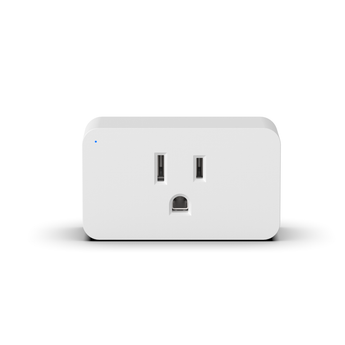


LAMP-ZW2


The Versa Wireless LAMP-ZW2 is a Z-Wave 800 Series Long Range plug-in lamp dimmer. It sits between a grounded indoor outlet and a lamp, and it turns that outlet into a dimmable one. Installers also call this kind of device a Z-Wave lamp module. No wiring, no wall plate, no electrician. The device marking calls it a Z-Wave Dimmer Plug (800S). It is also officially Alarm.com approved. A dealer can add it to an Alarm.com account and control it natively, with no secondary app and no workaround.
It is a real smart dimmer: it sets a brightness level, not just an on or off state. It sets a brightness level anywhere from 10 to 99 percent out of the box, on up to 200W incandescent or 100W dimmable CFL/LED. That makes it the dimmable smart plug for a table lamp, a floor lamp, or any portable fixture you would rather not rewire. Parameters 11 and 12 move the bottom and top of that range if a bulb needs a different span.
Here is the part that is easy to miss. Most people set a plug in dimmer once and leave it. The LAMP-ZW2 puts two brightness levels on the button itself. Starting from off, parameter 13 decides where a single tap lands, and parameter 15 stores your own value for it. Parameter 14 decides what a double tap from off does, and by default it goes to the night light level in parameter 7. So from off, one tap can bring a lamp up for reading and two taps can drop it to 20 percent for the hallway at night. Both work at the plug, with no scene, no automation, and no hub involved. The lamp keeps doing it if the network goes down.
Setup is SmartStart. Scan the Z-Wave QR code on the back of the plug, then power it up, and it joins on its own within ten minutes. Long Range mode is a SmartStart join on an 800 Series controller with Long Range switched on. On classic mesh the plug also repeats for other mains-powered devices. Once it is paired the hub runs it through groups, schedules and automations, and most controllers add remote control from a mobile app while you are out. Full figures are in the Specifications tab, and every parameter is listed in the LAMP-ZW2 installation manual.
Key features
- Z-Wave 800 Series with Long Range - Up to 1300 ft direct-to-controller (LR) - 330 ft (100 m) per hop (mesh).
- Officially Alarm.com approved - native control on Alarm.com dealer accounts.
- True plug-in dimmer - sets any level from 10 to 99 percent out of the box.
- Rated for 200W incandescent and 100W dimmable CFL/LED.
- Two brightness levels on the button - single tap and double tap are both configurable.
- SmartStart pairing by QR code, with S2 encrypted joining.
- Built-in repeater on classic mesh - strengthens the network for other mains-powered devices.
- Works with older and newer Z-Wave devices on the same smart home network.
- Remote control from your hub's mobile app, with groups, schedules and automations.
- Remembers its on/off state through a power cut (parameter 8).
- Button lockout for rentals and commercial jobs (parameters 16 and 17).
- Indoor, US 125VAC - ETL Listed by Intertek, FCC Part 15 Class B, Z-Wave certified.
LAMP-ZW2 specifications
Z-Wave 800 Long Range plug-in lamp dimmer
| Wireless & Z-Wave | |
|---|---|
| Protocol | Z-Wave 800 Series with Long Range |
| Frequency | 908.42 / 916 MHz mesh - 912 / 920 MHz LR |
| Range | Up to 1300 ft direct-to-controller (LR) - 330 ft (100 m) per hop (mesh) |
| Signal repeater | Built-in on classic mesh - strengthens the network for other mains-powered devices |
| Controller compatibility | All Z-Wave certified controllers. Officially listed: Alarm.com, 2GIG EDGE, Qolsys IQ, SmartThings, Hubitat, Home Assistant |
| Alarm.com approved | Yes - approved for Alarm.com dealer accounts |
| Backward compatibility | Older and newer Z-Wave devices work together on one network |
| Pairing & security | |
| SmartStart | Yes - scan the Z-Wave QR code on the back of the plug or on the label |
| Security | S2 Authenticated and Unauthenticated |
| Long Range joining | SmartStart, on an 800 Series controller with Long Range enabled |
| Association group 1 | Lifeline - up to 5 devices. Reports switch state and Device Reset Locally |
| Association group 2 | Basic Set on/off - up to 5 devices, sent when the button toggles the load |
| Configuration parameters | 20, all settable from the hub. See the parameter guide |
| Factory reset | Press the button twice quickly, then hold the third press for 10 seconds |
| Power & load | |
| Input | 125VAC, 60Hz |
| Load - incandescent | 200W max |
| Load - dimmable CFL/LED | 100W max |
| Brightness range | 10 to 99 percent by default. Parameter 11 sets the minimum, parameter 12 the maximum |
| Connection | Grounded 3-wire plug. A grounding-type outlet is required |
| Power-loss memory | Returns to its previous state (parameter 8 default) |
| Fade times | Set separately for button on, button off, hub on and hub off (parameters 9, 18, 19, 20). Hold-to-dim speed is parameter 10 |
| Function & indicators | |
| Device type | Plug-in dimmer (on/off and dimming) |
| Button | 1x on/off, hold to dim, 2x night light, 3x add or remove, 5x set minimum, 8x power-fail setting, 10x set maximum |
| Single and double tap | Configurable, acting from off. Parameter 13 with 15 sets the single-tap level, parameter 14 with 7 sets the double-tap level |
| LED indicator | As shipped the LED is lit when the lamp is off and dark when it is on (parameter 2 night-light mode). Parameter 2 flips or disables that, parameter 3 sets the color (default blue). Pulsing = adding in progress. Solid magenta = removing, or network failure |
| Local lockout | Parameter 16 sets what can control the plug: hub only (0), button and hub together (1, default), or neither (2). Parameter 17 blocks programming from the button |
| Operating conditions | |
| Use | Indoor, dry location only |
| Market | US (125VAC), sold in the United States |
| Certifications & compliance | |
| Safety listing | ETL Listed by Intertek - conforms to UL Std. 60730-1:2016, certified to CSA Std. E60730-1:2015 (c-US mark) |
| FCC | Part 15 Class B - FCC ID 2AD9XLAMP-ZW2 |
| Z-Wave Alliance | Alliance product #5062 Cert ZC14-24040421 |
| Version | 8.0, as marked on the device |
Indoor use only, in dry locations. The plug has a grounding pin and fits a grounding-type outlet only. Do not modify the plug. If it will not fit your outlet, have a qualified electrician fit the right one. Stay inside the load ratings above. Do not use this device to control medical or life-support equipment, electric heaters, sun lamps, heat lamps, or any appliance that could become hazardous if it switched on unattended. Install to the National Electrical Code and your local rules.
The LAMP-ZW2 works with any Z-Wave certified controller. Versa officially lists Alarm.com, 2GIG EDGE, Qolsys IQ, SmartThings, Hubitat and Home Assistant with a Z-Wave 800 controller. For Long Range, pair it to an 800 Series Long Range controller using SmartStart. The LAMP-ZW2 setup guide walks through pairing step by step, and the installation manual carries the full parameter table.
LAMP-ZW2 questions installers ask
Can a smart plug dim lights?
This one can. The LAMP-ZW2 sets a brightness level, not just on or off. Your hub sees it as a dimmer rather than a plain on/off device. So you get a slider instead of a toggle, and a scene can call for 40 percent rather than full output.
The range is 10 to 99 percent as it ships. Parameter 11 sets the floor and parameter 12 sets the ceiling if a particular bulb wants a narrower span.
Is the LAMP-ZW2 a plug in lamp dimmer or a smart plug?
It is both, and the two descriptions do not fight. It plugs into a standard grounded indoor outlet the way a smart plug does. It dims the lamp the way a wall dimmer does. The device marking reads Z-Wave Dimmer Plug (800S).
If you are shopping for a dimmable smart plug or a plug-in dimmer, this is the same product under a different name.
Is the LAMP-ZW2 Alarm.com approved?
Yes. The LAMP-ZW2 is officially Alarm.com approved. That approval is specific to the LAMP-ZW2 and does not extend to the other Versa Z-Wave devices. Dealers running Alarm.com accounts can add it to a customer install and control it natively from the platform. There is no secondary app and no workaround.
It is also listed in the Alarm.com knowledge base as a supported Z-Wave Long Range light.
What bulbs and wattage does the LAMP-ZW2 support?
Up to 200W incandescent, and up to 100W dimmable CFL/LED. Those are the words and the figures printed on the back of the plug, so you can check the page against the device in your hand.
Use bulbs marked dimmable. That marking on the lamp is what lets the dimmer hold a steady level near the bottom of its range.
How do I add, pair, or reset the LAMP-ZW2?
To add it by QR code: scan the Z-Wave QR code on the back of the plug with your controller app, then plug the device in. It joins on its own within ten minutes. This is also how it joins in Long Range mode, on an 800 Series controller with Long Range enabled.
To add it by button: set the controller to add a device, then press the program button three times quickly. The LED flashes while it joins. This route joins the classic mesh.
To remove it: set the controller to remove a device, then press the button three times quickly.
To factory reset it: press the button twice quickly, then hold the third press for ten seconds. Use this only when the controller is gone or will not respond.
How far does the LAMP-ZW2 reach on Z-Wave Long Range?
Up to 1300 ft direct to the controller on Long Range, and 330 ft (100 m) per hop on classic mesh. The two numbers measure different things. On Long Range the plug talks straight to the hub, so 1300 ft is one link with nothing in between. On mesh, 330 ft is the length of a single hop, and the network reaches further by chaining hops through other mains-powered devices.
Pick the mode by where the lamp is. A lamp in a guest house, a shop, or a far corner of a big property is the case Long Range was built for. A lamp inside a house that already has Z-Wave smart devices is usually better on mesh, because there the plug also repeats for its neighbors. A plug added in Long Range mode has one neighbor, the controller, so it is not repeating for anything while it is in that mode.
Can I set a night light level and a favorite brightness on the button?
Yes. The button holds two levels, and both are yours to choose.
Single tap from off: parameter 13 decides where it lands. Leave it at 0 for the last level used, or set it to 1 and store your own percentage in parameter 15. Settings 2 and 3 go to the maximum from parameter 12 or straight to 100 percent.
Double tap from off: parameter 14 decides what happens. By default it goes to the night light level in parameter 7, which ships at 20 percent.
Both run at the plug. No scene, no automation, no hub in the path, so the lamp keeps behaving that way even if the network is down.
Which hubs and controllers work with the LAMP-ZW2?
Any Z-Wave certified controller. Versa officially lists Alarm.com, 2GIG EDGE, Qolsys IQ, SmartThings, Hubitat and Home Assistant with a Z-Wave 800 controller.
Long Range mode needs an 800 Series controller with Long Range turned on, and the plug joins that mode by SmartStart QR scan. Panels add Long Range support in firmware, so check your panel release notes for the version that enables it. On a controller without Long Range the plug still works, and joins the classic mesh instead.
Can I lock out the button on the LAMP-ZW2?
Yes, with two parameters. Parameter 16 chooses what can control the plug: hub only (0), the button and the hub together (1, the default), or neither (2). Parameter 17 leaves the button working for on, off and factory reset, but stops it being used for adding, removing, setting the power-fail behavior in parameter 8, or setting the brightness limits.
That combination is useful in a rental, a short-term rental, or a commercial job where a lamp should be under hub control and not adjustable by hand.
What is the difference between the LAMP-ZW2 and the DIM-ZW?
Both are Versa Z-Wave 800 Long Range dimmers on the same radio, and both set a brightness level rather than a state. The difference is where they sit and what they dim.
The LAMP-ZW2 is a plug-in dimmer. It goes between an outlet and a lamp, dims 200W incandescent or 100W dimmable CFL/LED, and needs no wiring work. It is the Alarm.com approved device in the Z-Wave line.
The DIM-ZW in-wall dimmer switch is the wired one. It replaces a single-pole or 3-way wall switch on a circuit with a neutral, and dims the hardwired fixture. It is rated much higher, at 600W incandescent or 300W dimmable LED or CFL. Choose the LAMP-ZW2 for a portable fixture, and the DIM-ZW when the light is wired into the ceiling. For a hardwired circuit that only needs on and off, the SWITCH-ZW in-wall light switch is the one to use.
Where to buy the LAMP-ZW2
- Dealers and distributors: order through WAVE Electronics or the SS&Si Dealer Network, which carries the full Versa line.
- Single units: available on Amazon, or add it to your cart here.
- Dealer pricing tiers: open a Versa wholesale account for volume pricing across the sensor and Z-Wave line.
- Related: see the full Z-Wave 800 range, read how far Z-Wave 800 Long Range actually reaches, or request 5 free Versa sensors for your next install.


