
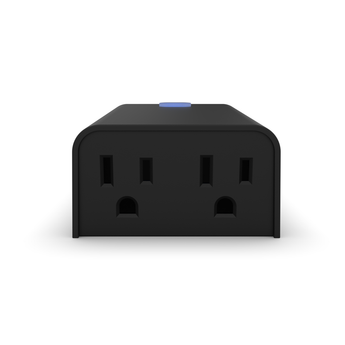


Z-Wave 800 Long Range - Outdoor smart plug
PLUG-OD-ZW Z-Wave Outdoor Smart Plug

IP65 outdoor plug with two grounded outlets you switch separately from your hub, rated 15 A total and good from -4 to 122 deg F. Hangs from a GFCI receptacle, no wiring.
Where to buy the PLUG-OD-ZW

Don't see your distributor? See all Versa distributors ->
At a glance
On this page: Overview Features Setup Specs Controllers FAQ
Overview
An outdoor smart plug on Z-Wave 800 Long Range
The Versa Wireless PLUG-OD-ZW is a Z-Wave outdoor smart plug built on Z-Wave 800 Series Long Range. It's an IP65 plug-in module, rated for outdoor use, with two grounded outlets you can switch separately. It hangs from an outdoor receptacle and needs no wiring, so you get a switched Z-Wave outdoor outlet without changing anything in the wall. You control each outlet from your hub, or from the button on the unit. On Long Range it reaches up to 1300 ft straight to the controller, or 330 ft (100 m) per hop on classic mesh.
Two outlets, one device. Each outlet is a separate Z-Wave endpoint, so your hub sees two switches under a single paired device. Run the string lights on one and the landscape lighting on the other, on separate schedules. One outdoor plug also uses one device slot on your controller instead of two, which matters on panels that cap their Z-Wave device count.
The enclosure is IP65 rated and the plug runs from -4 to 122 deg F, so it stays outside through the season. You install it the way the enclosure was designed to work. Plug it into a covered Class A GFCI weatherproof receptacle on a 20 A protected circuit. Then hang it vertically with the outlets facing downward, more than 1 ft above the ground. It's rated for 15 A total between the two outlets, shared. That covers 15 A general purpose or resistive, 1250 W incandescent or tungsten, or a 1/2 HP motor. The motor rating is what lets it run a pump or a fan, not only lights.
Setup is a QR scan. You scan the Z-Wave QR code on the unit and a SmartStart hub adds it on its own with S2 encryption. The DSK code is printed on the packaging box, so keep the box until the plug is paired. Seven settings cover the indicator, its brightness, the power-cut behavior and the four timers, one on and one off per outlet. We explain them in our guide to Z-Wave configuration parameters and association groups, and the step-by-step is in the PLUG-OD-ZW installation manual.
Key features
What you get in the box
- Z-Wave 800 Series with Long Range, and that means real reach: Up to 1300 ft direct-to-controller (LR) - 330 ft (100 m) per hop (mesh).
- Two grounded outdoor outlets, and each one switches on its own Z-Wave endpoint.
- An IP65 enclosure rated for outdoor use, which runs from -4 to 122 deg F (-20 to 50 deg C).
- Rated for 15 A total between the two outlets, which covers 15 A general purpose or resistive, 1250 W incandescent or tungsten, or a 1/2 HP motor.
- SmartStart pairing by QR code, with S2 encrypted joining.
- Timers held in the plug, with an auto turn-off and an auto turn-on for each outlet, 1 to 65535 minutes.
- Power-cut memory, so each outlet comes back off, on, or to its last state.
- An indicator you can tune, with three brightness levels and a mode you change from the button too.
- Built-in repeater on classic mesh, which extends coverage for its neighbors; on Long Range it links straight to the controller instead.
- Plays well with your existing network, because older and newer Z-Wave devices work together.
- A 5.5 in. x 2.2 in. x 4.5 in. polycarbonate housing on a 6.1 in. cord.
- US 125 VAC, ETL Listed (c-US) by Intertek, FCC Part 15 Class B and Z-Wave Plus certified.
Setup
Mount, add, pair or reset the PLUG-OD-ZW
Check the receptacle
It has to be a covered Class A GFCI weatherproof receptacle on a 20 A protected circuit, with a cover that closes over the plug and cord. Then hang the unit vertically, outlets facing down, more than 1 ft above the ground.
Add it by QR code
Scan the Z-Wave QR code on the unit with your controller app, then plug it in. It joins on its own with S2 encryption. On an 800 Series controller with Long Range enabled, this is how it joins in Long Range mode. The DSK is on the packaging box.
Or add it by button
Set the controller to add a device, then press the button three times quickly. The LED flashes blue, then lights green for two seconds when it's added, and this route joins the classic mesh. Finish pairing before you plug in a load.
Remove or reset it
To remove it, set the controller to remove a device and press the button three times quickly. To factory reset it, click the button twice quickly and hold the third press for ten seconds.
An outdoor plug is often the device that sits furthest from the hub, which is why the pairing mode matters here more than indoors. Scan the QR code to a Long Range hub when the plug is at the end of a driveway or across a big yard. Add it by button to the classic mesh when it sits close to the house and you'd like it to repeat for its neighbors.
Specifications
PLUG-OD-ZW specifications
Z-Wave 800 Long Range outdoor dual-outlet smart plug
| Wireless & Z-Wave | |
|---|---|
| Protocol | Z-Wave 800 Series with Long Range |
| Frequency | 908.42 / 916 MHz mesh - 912 / 920 MHz LR |
| Range | Up to 1300 ft direct-to-controller (LR) - 330 ft (100 m) per hop (mesh) |
| Signal repeater | Built-in on classic mesh - always powered, so it repeats for other devices. Added in Long Range mode it links straight to the controller instead |
| Controller compatibility | All Z-Wave certified controllers; LR needs an 800 Series controller with LR enabled. Officially listed: 2GIG EDGE, Qolsys IQ, SmartThings, Hubitat, Home Assistant |
| Backward compatibility | Any Z-Wave certified network - older and newer devices work together |
| Device class | Generic SWITCH BINARY | Role Always On Slave |
| Endpoints | 2 - one per outlet (left and right), reported over Multi Channel |
| Device IDs | Manufacturer 0x0464 | Product Type 0xAC01 | Product ID 0x0097 |
| Version | 1.0, as marked on the device (Z-Wave SDK 7.24.1, Z-Wave version 8.2) |
| Pairing & security | |
|---|---|
| SmartStart | Yes - scan the Z-Wave QR code on the unit; the DSK is printed on the packaging box, so keep it until the plug is paired. Long Range needs SmartStart and an LR-enabled hub |
| Security | S2 security |
| Add / remove by button | Button 3x quickly to add (blue flashes, green 2 s = added; the LED starts blinking within 30 s of first plug-in); 3x quickly to remove (purple flashes, then green 2 s) |
| Association group 1 | Lifeline - up to 5 devices, Binary Switch Report; most controllers set it up during inclusion |
| Association group 2 | Left outlet - Basic Set, up to 5 devices, triggered by button control of the local load, set through the gateway. The right-outlet group is published in the manual once the factory confirms it |
| Configuration parameters | 7 total - 1 through 7. See the parameter guide |
| Factory reset | Click the button 2x quickly, then hold at least 10 seconds; the light flashes once when it succeeds. Removing the plug from your hub also resets it |
| Power & load | |
|---|---|
| Input | 125 VAC, 60 Hz |
| Maximum load | 15 A total between the 2 outlets, shared |
| Load types | 15 A general purpose | 15 A resistive | 1250 W incandescent | 1250 W tungsten | 1/2 HP motor |
| Outlets | 2 switched, grounded 3-wire, controlled independently |
| Cord | 6.1 in. (155 mm), grounded 3-prong plug |
| Power-fail restore | Parameter 6 - 0 = off, 1 = on, 2 = the state before the power failure (default) |
| First power-up | Both outlets off, blue LED on. Already on a network: each outlet returns to its last state with a soft start |
| Function & indicators | |
|---|---|
| Device type | Outdoor plug-in on/off module, 2 outlets (binary switch) |
| Button | On the unit. 1x = left outlet on / off | 2x = right outlet on / off | hold 3 s = all outlets on / off | 3x = add or remove | 2x then hold 10 s = factory reset |
| Button parameter stepping | 6x cycles parameter 1 (LED indicator) | 8x cycles parameter 7 (indicator brightness) | 10x cycles parameter 6 (state after power failure) |
| Timers | Auto turn-off for each outlet (parameters 2 and 3) and auto turn-on for each outlet (parameters 4 and 5), 1 to 65535 minutes, set from your controller |
| LED indicator mode | Parameter 1 - 0 = Relay (default), 1 = pos, 2 = ON, 3 = OFF, as the manual prints them. Step it with 6 taps |
| Indicator brightness | Parameter 7 - 0 = Bright, 1 = Medium, 2 = Low (default) |
| LED indicator | Blue steady = an outlet is on (parameter 1), also lit on first power-up before the plug joins a network | blue off = both outlets off | blue flashing = adding | purple flashing = removing | green 2 s = add or remove succeeded |
| Physical & operating conditions | |
|---|---|
| Dimensions | 5.5 in. x 2.2 in. x 4.5 in. (140 mm x 56 mm x 115 mm) housing |
| Operating temperature | -4 to 122 deg F (-20 to 50 deg C) |
| Enclosure | IP65 rated for outdoor use, polycarbonate |
| Use | Indoor / outdoor. Hang vertically with the outlets facing downward, more than 1 ft above the ground surface |
| Origin | Made in Vietnam |
| Warranty | 2 years from the original date of consumer purchase |
| Certifications & compliance | |
|---|---|
| Safety listing | ETL Listed by Intertek (c-US) - certified to UL Std. 60730-1 and CSA Std. E60730-1:2015 | Intertek control no. 5030071 |
| FCC | Part 15 Class B - FCC ID 2AD9XPLUG-OD-ZW |
| RF exposure | FCC uncontrolled-environment limits - 20 cm minimum separation from any person |
| Z-Wave Alliance | Z-Wave Plus certified - Z-Wave 800 Long Range, SDK 7.24.1 |
Plug the unit only into a covered Class A GFCI-protected weatherproof receptacle, on a circuit with 20 A branch-circuit overcurrent protection. The cover must close completely over the plug and cord. Do not use an extension cord. Hang the unit vertically with the outlets facing downward, more than 1 ft above the ground surface. Do not install or use within 10 ft of a pool, and do not use in a bathroom. Do not exceed 15 A total between the two outlets. Never use this plug to control medical or life-support equipment, electric heaters, or any device that could become hazardous if switched unattended. Keep appliance-controlling devices out of groups and scenes, because schedules, automations or network errors can cycle a device unintentionally. Install per the National Electrical Code (NFPA 70) and local regulations in the United States, or the Canadian Electrical Code in Canada. Where code requires it, have a licensed electrician do the work.
Controllers
Hubs and panels the PLUG-OD-ZW works with
Any Z-Wave certified controller runs the PLUG-OD-ZW, and we officially list 2GIG EDGE, Qolsys IQ, SmartThings, Hubitat and Home Assistant with a Z-Wave 800 controller. For Long Range you pair it to an 800 Series Long Range controller with SmartStart. On a controller without Long Range it still works and joins the classic mesh instead, where it repeats for its neighbors. Long Range is also where the category is heading, since most new Z-Wave certifications are Long Range.
Documentation: the PLUG-OD-ZW installation manual, the parameter guide, and how far Z-Wave 800 Long Range actually reaches. The rest of the line is in the Versa installation manuals library. See the full Z-Wave 800 range, or request 5 free Versa sensors for your next install.
FAQ
PLUG-OD-ZW questions installers ask
Can I control each outlet separately?
Yes, and that's the main thing this plug does. Each outlet is its own Z-Wave endpoint, so your hub lists two switches and you turn each one on and off independently. The button does the same at the unit: tap once for the left outlet, twice for the right, and hold three seconds to switch both.
Each outlet also gets its own timers, so one can run on a schedule while the other stays on. The 15 A rating is the total for the pair, shared between the two loads.
Does the PLUG-OD-ZW need a hub?
Yes, for Z-Wave control. A Z-Wave certified controller is what gives you remote control of the outlets, scenes and schedules. Any Z-Wave certified hub works, and Long Range mode needs an 800 Series controller with Long Range switched on.
The button works with or without a hub, so the plug still switches by hand if your network is down.
How do I add, pair, or reset the PLUG-OD-ZW?
To add it by QR code: scan the Z-Wave QR code on the unit with your controller app, then plug it in. It joins on its own with S2 encryption. This is also how it joins in Long Range mode, on an 800 Series controller with Long Range enabled.
To add it by button: set the controller to add a device, then press the button three times quickly. The LED flashes blue, then lights green for two seconds when it's added. This route joins the classic mesh.
To remove it: set the controller to remove a device, then press the button three times quickly. The LED flashes purple, then green for two seconds.
To factory reset it: click the button twice quickly, then hold for at least ten seconds. The light flashes once when the reset succeeds. Use this only if your primary controller is missing or won't respond. Removing the plug from your hub also resets it.
What kind of outlet does the PLUG-OD-ZW need outdoors?
A covered Class A GFCI weatherproof receptacle, on a circuit with 20 A branch-circuit overcurrent protection. The cover has to close completely over the plug and the cord, and if yours doesn't have one, an electrician can fit it.
Hang the unit vertically with the outlets facing downward, more than 1 ft above the ground. That's what keeps water out of the enclosure, and it's how the IP65 rating is meant to be used. The safety note under the specifications has the full list, including the distance to keep from a pool.
What can I plug into the PLUG-OD-ZW?
Anything inside its ratings at 125 VAC. The plug is rated for 15 A total between the two outlets. That covers 15 A general purpose or resistive, 1250 W incandescent or tungsten, or a 1/2 HP motor. You share the 15 A between the two loads rather than drawing 15 A from each.
The motor rating is the one that widens what this plug is for. A 1/2 HP limit covers a pond or fountain pump, a fan, or a small outdoor tool, alongside the string lights and landscape lighting an outdoor plug usually runs. Read the safety note under the specifications before you pick a load.
How cold can the PLUG-OD-ZW get?
It runs from -4 to 122 deg F, which is -20 to 50 deg C. That covers a normal winter in most of the country and a hot patio in summer.
The housing is polycarbonate and the enclosure is IP65 rated, so rain and dust are what it was built for.
How far does the PLUG-OD-ZW reach on Z-Wave Long Range?
Up to 1300 ft direct-to-controller on Long Range, and 330 ft (100 m) per hop on classic mesh. The two numbers measure different things. On Long Range the plug talks straight to your hub, so 1300 ft is one direct link. On mesh, 330 ft is one hop, and the network reaches further by chaining hops through other mains-powered devices.
This is the reach that makes a Z-Wave outdoor plug practical at the end of a driveway, on a detached garage or across a large yard. Those are the spots where a mesh signal has to leave the house and usually runs out.
Does the PLUG-OD-ZW work as a Z-Wave repeater?
On a classic mesh, yes. The plug is always powered, so it passes traffic for other devices and strengthens coverage around it, and an outdoor plug sits between the house and anything further out.
There's a catch worth knowing before you pair it. Long Range is a direct link to the controller, so a plug added in Long Range mode repeats for nothing while it's in that mode. You pick the mode by the job. Scan the QR code to a Long Range hub when you need reach, and add it by button to the classic mesh when you want a repeater.
Can each outlet run on a timer?
Yes, and the timers live in the plug rather than in the hub. Each outlet has its own auto turn-off and auto turn-on delay. Parameters 2 and 3 are the off delays for the left and right outlet, and 4 and 5 are the on delays.
All four take 1 to 65535 minutes, which is a minute at one end and about 45 days at the other, and all four ship disabled. You set them from your controller.
What does the PLUG-OD-ZW do after a power failure?
By default each outlet returns to the state it was in before the power went out. Parameter 6 controls this. Set it to 0 and the outlets stay off when power returns, or set 1 and they turn on. Leave it at 2 and they go back to their last state, which is how we ship it.
You can change it at the unit with no hub in the room: press the button ten times to step parameter 6 one value.
What is the difference between the PLUG-OD-ZW and the PLUG-ZW?
Both are Versa Z-Wave 800 Long Range plug-in modules on the same radio, and both switch their outlets on and off. The difference is where they go and how many outlets they give you.
The PLUG-OD-ZW is the outdoor one, and it's a dual outlet outdoor plug: two outlets you switch separately, under one shared 15 A rating. Its IP65 enclosure runs from -4 to 122 deg F. The PLUG-ZW is the indoor one, with a single switched outlet in a compact housing for a lamp or an appliance. So you pick the PLUG-OD-ZW when the load is outside or when you need two circuits from one device, and the PLUG-ZW when it's a single indoor load.


